- The first 3 seconds decide the view. TikTok, Reels, and Shorts rank clips on how long people watch, so a slow opening caps your reach before the algorithm tests it wider.
- A hook has three layers. What you say, what the viewer sees, and the text on screen. Land all three in frame one.
- Most of the feed is on mute. Word-by-word captions are the difference between a scroll and a watch.
- Pacing keeps the win. Change something on screen every few seconds so attention never has a reason to drift.
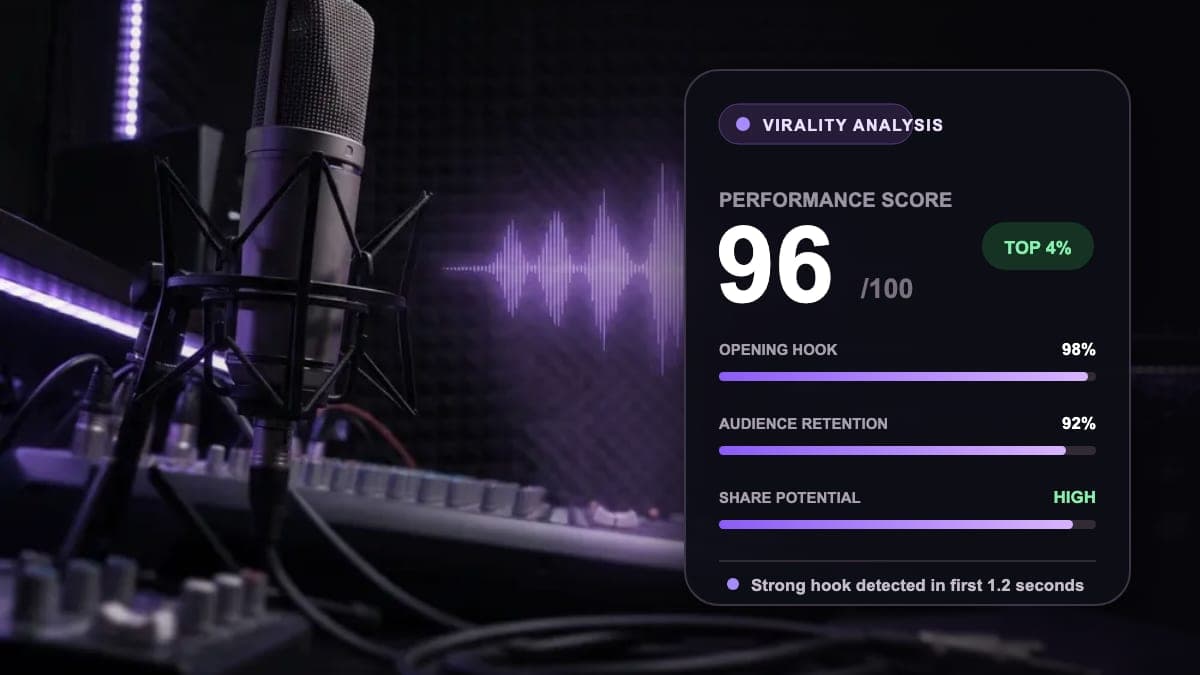
- Picking the moment is the hard part. ClipCut scores every clip 0 to 100 so you post the winners, not the guesses.
What actually makes a clip go viral
Virality feels like luck, but the mechanics behind it are boringly consistent. Short-form platforms do not rank clips by how many followers you have. They rank by how people behave in the first few seconds and how long they stay. YouTube has said Shorts are recommended largely based on how many viewers choose to keep watching, and TikTok's For You ranking leans heavily on watch time and completion rate. That is why a brand-new account with zero followers can land a clip in front of millions, and why a creator with a huge audience can post a dud that goes nowhere.
The signals that matter are completion rate (did people watch to the end), average watch time (how far the typical viewer got), rewatches (a looping clip quietly stacks watch time), and shares and saves (the strongest vote of all). Every technique in this guide exists to move one of those numbers. If you internalize nothing else, internalize this: you are not making a video, you are engineering a watch. The same logic drives every good breakdown of how to make YouTube Shorts that perform.
The anatomy of a hook (the first 1 to 3 seconds)
A hook is not one thing. It is three layers firing at once, and the strongest clips land all three inside the opening second:
- The verbal hook. The first sentence out of the speaker's mouth. This is what carries the idea, so it has to open a loop or stake a claim, not warm up.
- The visual hook. What fills the frame. A face mid-expression, motion, a striking setting. Anything but a static intro card or a logo animation.
- The text hook. A short line of on-screen text that states the promise in words, because most viewers are reading before they are listening.
The formulas that work all share one trait: they front-load tension. The open loop ('I lost $40,000 before I understood this') plants a question the brain wants closed. The bold claim ('Everything you know about posting times is wrong') triggers a challenge. The result-first reveal ('Here is what 90 days of this did') shows the payoff and makes you stay for the how. The direct callout ('If you edit your clips like this, stop') targets a specific viewer so they feel spoken to. Notice what none of them do: none open with 'Hey guys, welcome back,' a slow zoom, or three seconds of branding.
Front-load the payoff. The single most common fix that turns a flat clip into a strong one is moving the most surprising sentence to frame one. If the best line lands at second 12, most viewers never hear it. Cut straight to it and let the context follow.
Why the first frames decide the entire view
Here is the mechanic that makes hooks non-negotiable. When you post, the platform does not show your clip to everyone at once. It runs a quiet test, showing it to a small batch of viewers and measuring what they do. If a large share swipe away in the first two or three seconds, your average watch time craters and the test ends there. If they stay, the platform widens the audience and tests again. Reach is earned in rounds, and the opening seconds are the gate to every round after the first.
This is why the average clip only holds a fraction of its viewers to the end, and why slow intros are so expensive. A three-second logo sting is not a branding decision on short-form, it is a three-second exit ramp. The viewer's thumb is already resting on the screen, and the default action is to swipe. Your job in the opening frames is to give the brain a reason to override that default before it fires.
Pacing and pattern interrupts: keep the win
Landing the hook gets the watch. Pacing keeps it. Attention decays the moment nothing on screen changes, so the strongest clips never sit still. Editors have long found that changing something visually every few seconds, a cut, a zoom, a caption that pops, a graphic, resets attention and smooths out the mid-clip drop-off where most viewers leave. These pattern interrupts are the reason a talking head can hold a viewer for 40 seconds when a static shot of the same person loses them at 8.
The most reliable pacing fix is also the simplest: cut the dead air. Remove pauses, filler words, and the breaths between sentences. Jump cuts compress a rambling answer into a tight, urgent delivery. For conversations, switching between a solo shot, a split screen of two speakers, and a wide angle based on who is talking keeps a static podcast setup visually alive without any extra footage.
Cut the dead air first. Before you add a single effect, remove every pause and filler word. Tightening a 40-second answer to 25 seconds of pure signal does more for retention than any transition. Density is the point of short-form.
Captions: the feed is watching on mute
If your clip needs sound to make sense, you have already lost most of the audience. A widely cited Verizon Media and Publicis Media study found 69 percent of people watch mobile video with the sound off in public, and the muted share on TikTok is commonly put around 85 percent. People scroll in transit, in offices, in bed next to someone asleep. Captions are not an accessibility afterthought, they are how the majority of your viewers actually consume the clip.
Word-by-word animated captions do double duty. They make the clip legible in silence, and the movement itself is a pattern interrupt that gives the eye something to track word after word. A few rules keep them working: make them large and high-contrast, keep them centered in the safe zone rather than pinned to the very bottom where the platform's buttons live, and never let a caption run more than a line or two. The words should hit the screen in the same rhythm they are spoken.
Aspect ratio and framing
Vertical 9:16 is not a preference, it is the format the platforms are built around. Exported at 1080x1920, a vertical clip fills a phone screen edge to edge. A horizontal or square clip gets letterboxed into a thin strip, wastes most of the screen, and instantly reads as repurposed content the creator did not bother to reframe. That perception alone costs you watches.
Reframing is more than cropping to the center. If you naively crop a 16:9 interview to 9:16, the speaker drifts out of frame the moment they move. Proper reframing tracks the subject so the face stays centered, and for two-person shots it stacks both speakers in a split screen so no one gets cut off. Get this wrong and even a perfect hook is watching someone's ear for 30 seconds.
Picking the right moment (the hard part)
Everything above is teachable. Picking the moment is where most creators stall, because a two-hour podcast might contain four clip-worthy moments buried in two hours of good-but-not-viral conversation. A postable moment is almost always self-contained (it needs no missing context to land), carries tension or emotion, and has a clean in and out. Here is what to scan for:
| Signal | Why it works | Example |
|---|---|---|
| The hook line | A sentence that opens a loop or makes a bold claim the viewer needs resolved. | I lost $40,000 before I understood this. |
| An emotional peak | Surprise, laughter, or a vulnerable admission spikes engagement and shares. | A guest tears up recounting the moment they almost quit. |
| The punchline | A clean payoff that rewards the watch and earns rewatches and sends. | The one-liner that makes the whole room laugh. |
| A hot take | A contrarian opinion invites comments, and comments signal the algorithm. | Most productivity advice is procrastination in disguise. |
| The result reveal | Showing the outcome first creates a gap the viewer stays to close. | Here is what 90 days of cold plunges actually did. |
The mistake to avoid is posting a moment because it was interesting in the room. Interesting is not the bar. The bar is whether a stranger who has never heard of you would stop scrolling and stay. If a moment needs the previous ten minutes to make sense, it is not a clip, it is a footnote. This is doubly true for podcasters turning a long recording into a week of clips, where the temptation is to clip your favorite tangent instead of the moment that actually stops a thumb.
How ClipCut automates the hard parts
The techniques above are simple to understand and slow to execute by hand. Scrubbing a two-hour stream to find four moments, reframing each one, syncing captions, and writing titles is hours of work per video. This is exactly the gap ClipCut is built to close, and it is why the tool is aimed squarely at creators repurposing long-form video into shorts.
- It finds the moments for you. Paste a YouTube URL or upload a file up to 20GB, including two-hour podcasts and streams. ClipCut scans the entire video for hooks, punchlines, and emotional peaks, then cuts finished clips rather than rough timestamps.
- The Virality Score ranks them. Every clip is scored from 0 to 100 on pacing, emotion, and hook strength, so instead of guessing you start from a ranked shortlist and post the winners.
- It reframes automatically. Smart reframe converts 16:9 to 9:16 with face and subject tracking and exports at 1080x1920. Split screen stacks two speakers, and auto scene switching cuts between solo, split, and wide based on who is talking.
- Captions are handled. Word-by-word animated captions come in nine styles, are readable on mute, and are brandable. There are no watermarks on any plan, including the $9 tier.
- Titles are written for you. ClipCut generates hook titles and descriptions ready to paste, so the on-screen promise and the caption both pull their weight.
One honest boundary: ClipCut exports clips ready to post, it does not publish them for you. You still choose the platform and the timing, which matters more than most creators think. When you are ready to schedule, our guide to the best time to post YouTube Shorts covers the windows worth targeting. Plans and credits are laid out on the ClipCut pricing page, starting at $9 per month on the annual Creator plan.
A step-by-step workflow
Putting it together, here is the fastest repeatable path from a long video to a clip worth posting:
- Start with a strong source. Talking-head content (podcasts, interviews, webinars, streams) clips best because the value is in what people say, and speech is what AI reads most reliably.
- Let the AI rank the moments. Run the video through ClipCut and start from the highest Virality Scores instead of scrubbing manually.
- Fix the hook. Watch the first second of each candidate. If the best line is not at the front, trim so it is. Front-loading is the highest-leverage edit you can make.
- Confirm reframe and captions. Check that the speaker stays centered in 9:16 and that captions land in the safe zone, large and readable.
- Add the hook title. Paste the generated title as on-screen text so silent scrollers get the promise in words.
- Post with intent. Pick the platform and timing deliberately rather than dumping the same file everywhere at once.
Common mistakes that kill a clip
Avoid these five. Slow intros that burn the first three seconds. No captions on a muted feed. Burying the best moment in the middle. Posting horizontal or letterboxed footage. Running long when the idea was complete in 20 seconds. Each one quietly caps your reach no matter how good the content underneath is.
If you are choosing tools, it is worth understanding what separates a real viral-detection engine from a basic trimmer. Our Opus Clip alternative comparison breaks down where AI clipping tools actually differ on moment selection, reframing, and price, so you are not paying for features you will never open.
FAQ
How long should a viral clip be?
Most viral short-form clips land between 15 and 45 seconds. Shorter clips finish at a higher rate, and completion rate is one of the strongest ranking signals on TikTok, Reels, and Shorts. Only run past 45 seconds when every extra second earns its place. If the idea is complete in 20 seconds, cut it at 20.
Why are the first 3 seconds so important?
Short-form platforms rank clips mainly on how long people watch. The algorithm shows your clip to a small test audience first. If they swipe away in the opening seconds, average watch time collapses and distribution stops. TikTok's Business team reports that most of its highest click-through videos hook viewers inside the first three seconds, so a weak opening caps your reach before the content is ever judged.
Do I need captions to make a clip go viral?
Effectively, yes. A widely cited Verizon Media and Publicis Media study found 69 percent of people watch mobile video with the sound off in public, and the share is even higher on TikTok. If your clip only makes sense with audio, most of the feed cannot follow it. Word-by-word animated captions keep silent scrollers watching and give the eye motion to track.
Can AI actually find viral moments in a long video?
For talking-head content like podcasts, interviews, and streams, yes. ClipCut scans the whole video for hooks, punchlines, and emotional peaks, then scores every clip from 0 to 100 on pacing, emotion, and hook strength. Treat the Virality Score as a ranking tool that surfaces your best candidates fast, then apply human judgment to the top picks.
What is the best aspect ratio for a viral clip?
Vertical 9:16, exported at 1080x1920. It is the only ratio that fills a phone screen edge to edge on TikTok, Reels, and Shorts. Horizontal or square clips get letterboxed, waste screen space, and read as repurposed. ClipCut auto-reframes 16:9 footage to 9:16 with face and subject tracking so the speaker stays centered.
The bottom line
Viral is not a mystery. It is a hook in the first second, captions for a muted feed, pacing that never lets attention drift, a vertical frame, and the discipline to post only the moment that would stop a stranger's thumb.
The hard part is finding that moment and packaging it fast. That is the exact job ClipCut is built for: it reads the whole video, ranks the best clips 0 to 100, reframes and captions them, and hands you finished, watermark-free files ready to post. Join the 39,000+ creators who have generated 62,000+ clips at a 4.8-star rating.
Ready to Make Your First Viral Clip?
Turn a long video into ranked, ready-to-post shorts in minutes. Start with 30 free credits, no card required, full-power AI.
Start Clipping Free