

@creator.abeInstagram creator

Paste a YouTube link. ClipCut turns one long video into 10+ clips for TikTok, Reels, and Shorts, each reframed to 9:16, captioned, and scored 0 to 100 for viral potential. In minutes, not hours.


★★★★★
Loved by 39,000+creators & clippers
Landscape footage wastes two thirds of a phone screen. ClipCut finds the subject, crops to 9:16, and keeps them locked in frame as they move. No black bars, no severed heads.
Wide two-shots are the hardest thing to clip by hand. Crop to one person and you lose the reaction. ClipCut detects both speakers and stacks them into a single 9:16 frame, highlighting whoever is talking.
A single crop for a ten-minute clip is boring, and boring loses viewers. ClipCut cuts between framings as the conversation moves. Solo on whoever is talking, split when they talk over each other. The rhythm an editor would give it, generated automatically.
Every clip gets a scroll stopping hook title and word-by-word captions that read on mute, in different caption styles. As you see here on a real podcast clip.
No timeline, no scrubbing, no export queue. Three steps and you're posting.
Any YouTube URL or raw upload. Two hour podcast? Fine.
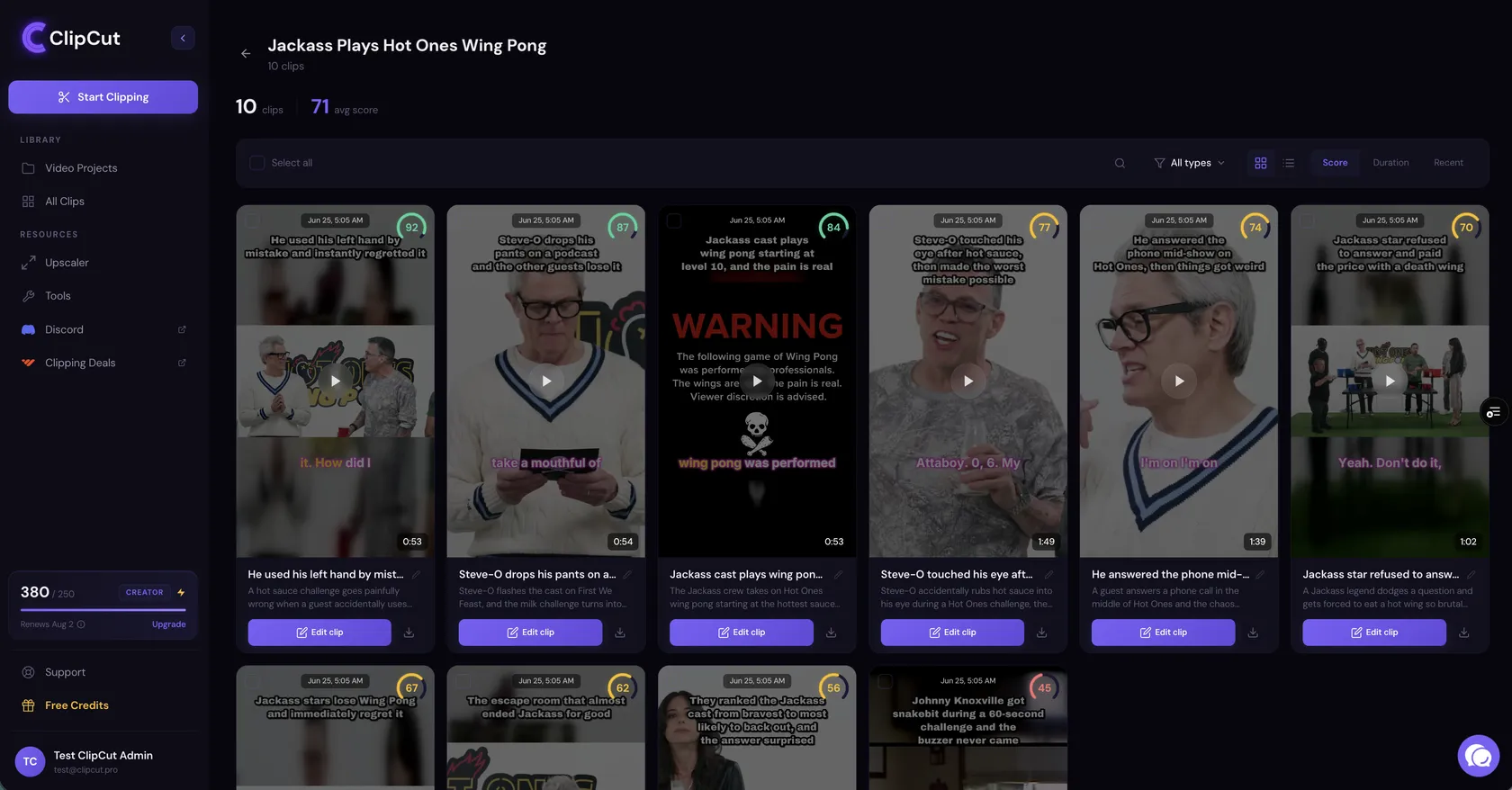
AI scores every moment 0 to 100. The best clips float to the top.
Reframed to 9:16, word synced captions, hook title on top, no watermark.
 92
92 87
87 84
84 77
77 74
74From $9/mo · No watermarks · Cancel anytime
Clip for paid campaigns, grow your own channel, or turn podcast episodes into a content engine. The workflow stays the same: paste a link, review the scores, ship your clips.
 Clippers
The clipping tool built for Whop campaigns. Content Rewards pay per view, so the pot goes to whoever posts first, posts most, and keeps submissions clean.
 Content creators
The AI clip maker for creators: one upload becomes a week of Shorts, Reels and TikToks, each with a viral score so you always know what to post first.
 Podcasters
The AI podcast clip maker that finds your best 60 seconds, buried somewhere in hour two, frames every speaker, and grows the show while you record the next episode.
The tools every other app charges extra for, bundled and tuned for short-form.
Scans every second to surface hooks, punchlines and emotional peaks, then cuts them clean. The instinct of a $3k editor, on every upload.
See how every clip will perform before you post. Pacing, emotion and hook strength, scored 0 to 100, so you only ship winners.
Word-by-word captions that hold attention on mute, branded to your channel.
Face and subject tracking keeps the action centered, landscape to portrait.
Solo, split-screen and wide framings chosen per moment, driven by who's speaking.
Every export is clean on every plan, including the $9 one. Nothing in the corner telling people which tool you used.
Hiring editors, doing it yourself, or a tool that misses the moment. Here's how they compare.
| ClipCut | Other AI tools | Hiring editors | Do it yourself | |
|---|---|---|---|---|
| Hours saved / week | 20+ | 10+ | 10+ | 0 |
| Monthly cost | $9+ | $29+ | $3,000+ | Your time |
| Subject tracking | ✓ | partial | ✓ | ✕ |
| Auto split-screen | ✓ | ✕ | ✓ | ✕ |
| Scene switching | ✓ | ✕ | ✓ | ✕ |
| Virality scoring | ✓ | maybe | ✕ | ✕ |
| Scales with output | ✓ | ✓ | ✕ | ✕ |
From solo podcasters to full agencies, a week of content in a single click.
“I make a living off of clipping, so I've tried a lot of tools. ClipCut is the best one I've used.”
“It picks and edits the most viral moments in 2 to 3 minutes, saving me tons of editing time.”

“We test a ton of AI tools every month, and ClipCut genuinely impressed us.”

“I've run my episodes through Opus and Crayo too. ClipCut is the only one whose AI actually understands virality.”

Real posts from creators clipping with ClipCut. Playing on mute. Tap any one for sound.
Every plan includes the viral moment detector, smart reframe, animated captions and watermark-free exports. Only credits, storage, resolution and processing speed change.
Everything you'd want to know before trying it.
ClipCut is an AI-powered video editing platform that automatically identifies the most engaging hooks and moments in long-form videos to create viral shorts for TikTok, Instagram Reels, and YouTube Shorts.
Unlike traditional editors that require manual clipping and hours of work, ClipCut uses advanced AI to automate the entire process. It looks specifically for viral potential, pacing and emotion, and delivers engaging clips in seconds.
Yes, that's what the split-screen and scene-switching engine is built for. ClipCut detects each speaker in a wide shot and either stacks them into one vertical frame or cuts between them based on who's talking.
Yes. Yearly subscribers receive their full 12 months of credits on day one, so you can batch-process a whole quarter of content in a single sitting.
Monthly subscription credits expire at the end of the billing cycle. You can upgrade or downgrade your tier anytime to match your needs.
ClipCut is trusted by over 39,000 creators and studios. Paid plans are final and non-refundable, but if you hit a genuine billing error or the product fails as described, email support@clipcut.pro and we'll make it right.
Cancel anytime under "Manage my subscription" in your account settings. No hoops, no hassle.

 Ready when you are
Join 39,000+ creators and clippers. Your first clips are minutes away, plans start at $9 a month, and you can cancel anytime.